 Get more Harry Potter patterns on Fandom in Stitches!
When Cheryl over at Cheryl’s Teapots2Quilting asked for permission to use some of my free patterns for an upcoming project she’s working on, I enthusiastically agreed!
What’s her project?
Well, you’ll just have to wait and see…don’t worry, I’ll share when she does!

What I can tell you is that she asked to use six of my Harry Potter patterns. She was planning to reduce each pattern to 4″, but I volunteered to do it myself.


All this happened at the same time that the hard drive on my laptop crashed. I have access to many of my files on my backup drive, but not EQ7, the design software I’ve been using for the last couple of years and I’m waiting for my laptop to be repaired and before I will have access to all my design tools. While I wait, I decided to try out Quilt Assistant, free block design software
I recommend this software all the time based on the experience of other designers I know over at Fandom In Stitches. It’s about time I try it out myself!

Now this software is not EQ7, and I knew that going in. I wasn’t expecting the bells and whistles of fancy design software, layout options, etc. QA is intended for individual block design, and if that’s what you need, and all you need, it’s perfect for that. I found it super easy to navigate and use and had redrafted several blocks using my original designs in a relatively short amount of time.
In addition to drafting patterns, you can also import a photo to follow, color and number images, as well as export and print different versions of your pattern.
Since most of the patterns I was redrafting were originally designed in Photoshop and not EQ7, I worked from my quilt blocks and “printed” my work to PDF.

I’m a picky girl when it comes to the way my patterns are presented. I like clear, concise lettering that goes left to right and top to bottom. If you’ve used any of my patterns previously, you will find they are all labeled this way. If a design software exists that allows complete control over labeling, I have not found it yet!
The following four images were generated using Quilt Assistant print options:

QA Print Option: Design at true size, no seam allowance added. Numbers generated with QA.
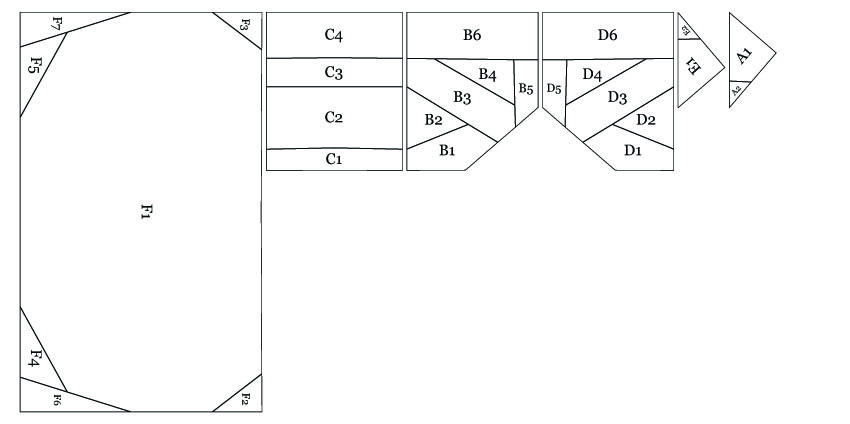
QA Print Option: Paper Pieced Pattern, no seam allowance added.

QA Print Option: Paper Pieced Pattern, Seam Allowance Added.

QA Print Option: Paper Pieced Pattern, Seam Allowance and Colors Added.
I printed to PDF as a paper pieced pattern with seam allowance but no color (third option above). I opened up each PDF file in Photoshop and rearranged the pieces so they would be as close to the actual piecing order as possible. In EQ7, arranging pattern piece placement on the page is an option before printing, one I use often.
I also deleted all the numbers generated by QA and renumbered each pattern myself so they would reflect my personal design style. I started designing back in 2004 using Photoshop for every step of the process. I still color and label all my patterns with it, even my patterns drafted in EQ7.
You will also find sewing order on all my patterns. When I first started paper piecing, I came across a very complicated pattern with oodles of asymmetrical pieces and no instructions whatsoever. It took me ages to figure out how it went together. Because of that, I started adding sewing order with my very first design!
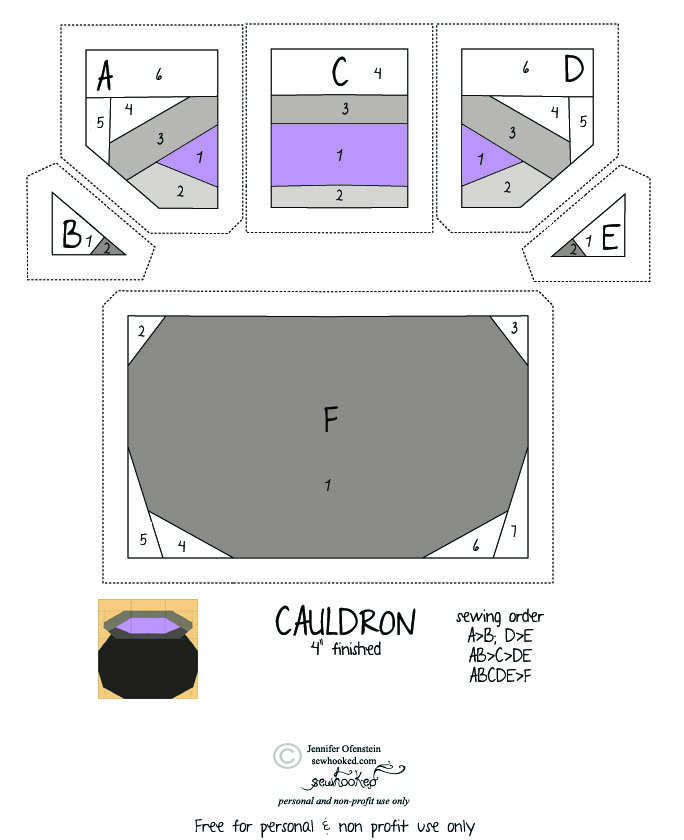 Making it mine: How the Cauldron pattern looked when I finished editing.
Download the 4″ Cauldron pattern
In a nutshell, Quilt Assistant is free, it’s easy to use and you can share your patterns from it by printing them to PDF with software like Primo PDF or Cute PDF. If you want to make changes, use Photoshop or open source software like Gimp. Save the file as a PDF for easier printing.
The best part about this for me? Well, a couple of things. First, I got to revisit some of my older Harry Potter patterns that I hadn’t played around with in ages. Second, I get to share these patterns with Cheryl and look forward to her upcoming project (and I hope you will, too!). Last of all, as soon as I’m up and running on my own computer again, I can export these files to EQ format and edit them just like any of my other EQ7 projects!
Direct links to the magically shrunken versions of the above blocks:
I hope my little review of Quilt Assistant is useful to you. If you’re still on the fence about designing your own paper pieced patterns or about using design software and you’re looking to draft individual blocks, give it a try. It’s a nifty tool, it’s free, and if you decide to upgrade to EQ7, all your QA work is exportable!
Visit the Quilt Assistant Website
A footnote: I am reviewing QA because I want to and for no other reason, but if you happen to take up pattern drafting, consider becoming a Fandom In Stitches Designer! Fandom In Stitches is my all-fandom quilt pattern site featuring Harry Potter, The Hobbit, Doctor Who, Sesame Street and much, much more! All the patterns are free and all the designers are volunteers!

To celebrate the Tabby Face Block Lotto, use coupon code TABBY in my Etsy shop to receive 10% off your total order during the month of September!

Time is running out!
Learn to paper piece with me now through December with my full-length video workshop available only through STITCHED. You get access to over 20 classes AND instructors and registration is now only $40! Click for details.
Sewhooked Shop | FB | SHFB | Flickr | Twitter | Bloglovin | Craftsy | Etsy Shop




 Sewhooked